
Who Actually Runs Your Microsoft Fabric Data Pipelines?

Identities involved with Fabric data pipelines might look simple at first, but there's more than meets the eye.
Pipelines have an owner, and an identity is tied to connections used to interact with other objects. When a pipeline run is triggered, you can also see who it was submitted by. But arguably the most impactful one is often overlooked - and that's the last modifier. Troubleshooting access or token-related errors can get confusing real fast if you don't take that into account.
This article covers common misconceptions and issues related to identities used during pipeline runs. I'll also explain what part each one plays in the grand scheme of things.
The identities behind every pipeline run
Before we explore where identities show up, let's briefly cover what an identity is, and what types of identities are available.
An identity is the key piece of access control. When anything is done in Fabric, the question "who is trying to do this" is always asked first - followed by "are they allowed to do this". This means an identity is always present when anything happens on the platform.
The most common one is the user identity. As you might expect, a user identity is tied to a specific user. When you take an action through the UI, such as creating an item or triggering a pipeline, your own user identity is used. It's simple to use, but a governance nightmare when used in production.
A service principal is a popular option to use instead. It is a non-human identity tied to an app registration in Microsoft Entra ID. Client ID and client secret are used to either set up a connection in Fabric or to fetch an access token to use for an API call. Service principals are the most common option for automated processes.
Workspace identities are managed identities tied to their respective workspaces. Creating a workspace identity can be done in workspace settings with just a couple of clicks. Using it is easy as there's no need to manage any credentials. Although handy, they're not that broadly supported yet, and have their own challenges.
Where identities show up with pipelines
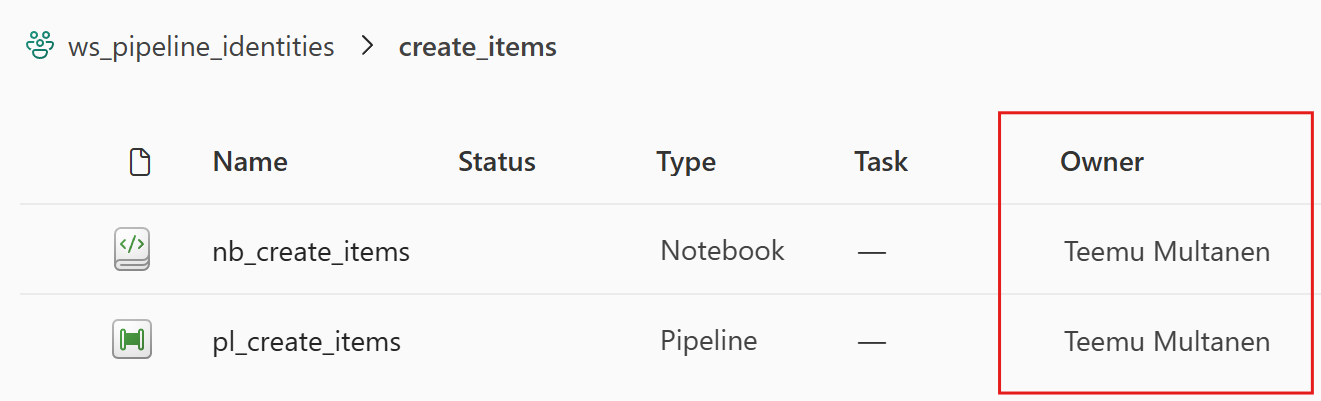
Item owner is the name visible in the workspace UI's owner column. By default, this is the identity that was used to create the pipeline item. Creating or deploying something through the UI will set the user as the owner. Using APIs with service principal tokens for item creation allows that service principal to become the owner. At this time, taking over ownership after an item is created is only possible through the UI, and only for the user identity that's doing the action.
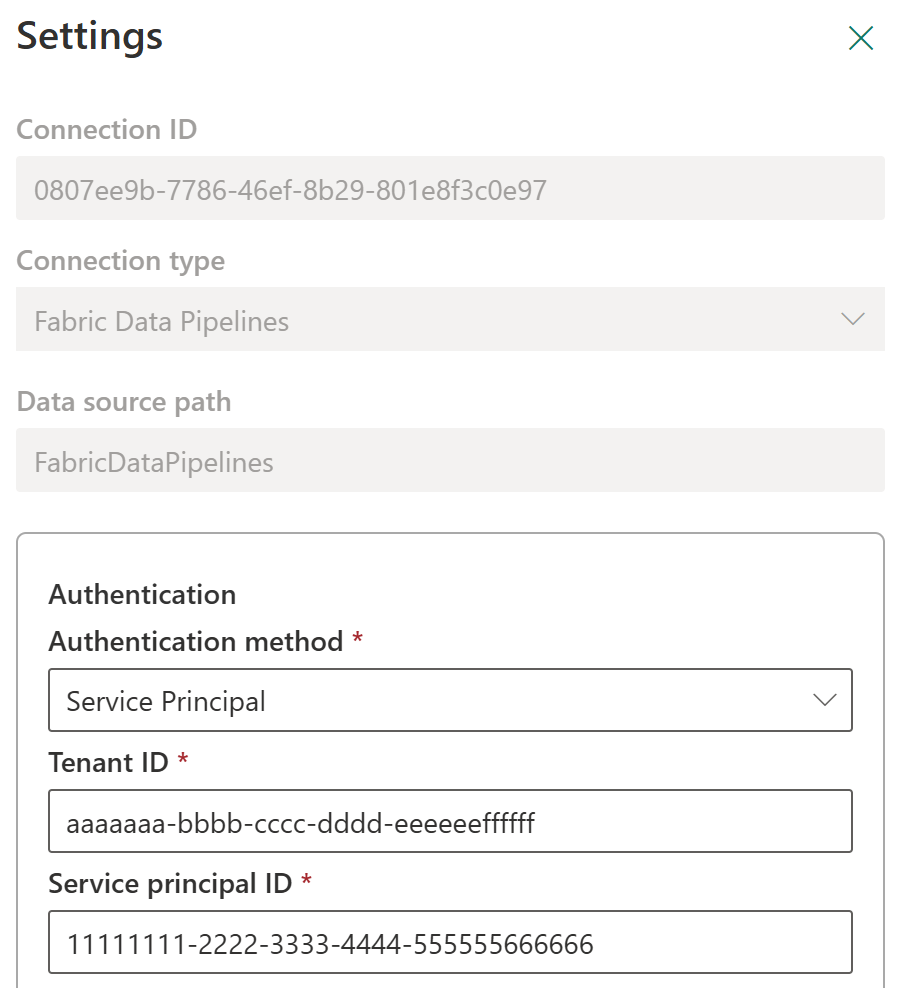
Connections store an identity. Supported identity types vary between different connection types. Fabric Data Pipeline connections currently support all three identity types presented above. Rights to use a connection can be shared without granting the user direct access to the underlying resources. They can still access those resources through the connection using its configured identity.
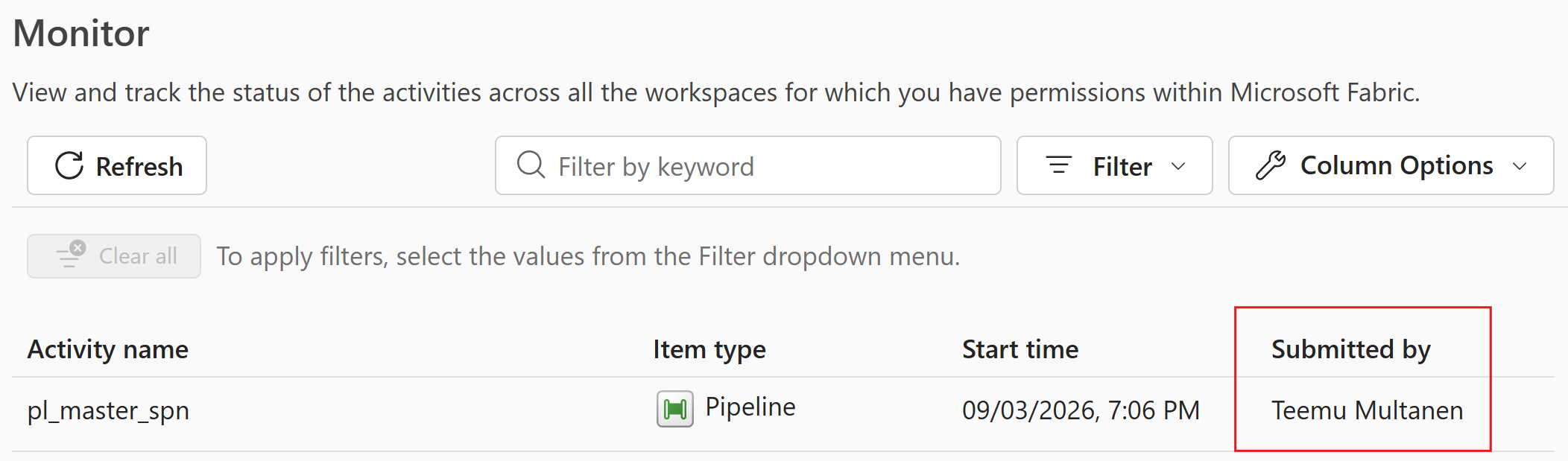
Submitted by is the identity that was used to submit the pipeline or notebook run. It can be seen in the monitoring view. When you trigger a pipeline manually, you'll see your name. When a connection is used to invoke a pipeline or a notebook, you'll see the identity the connection uses. There's more to this, but that will be covered later.
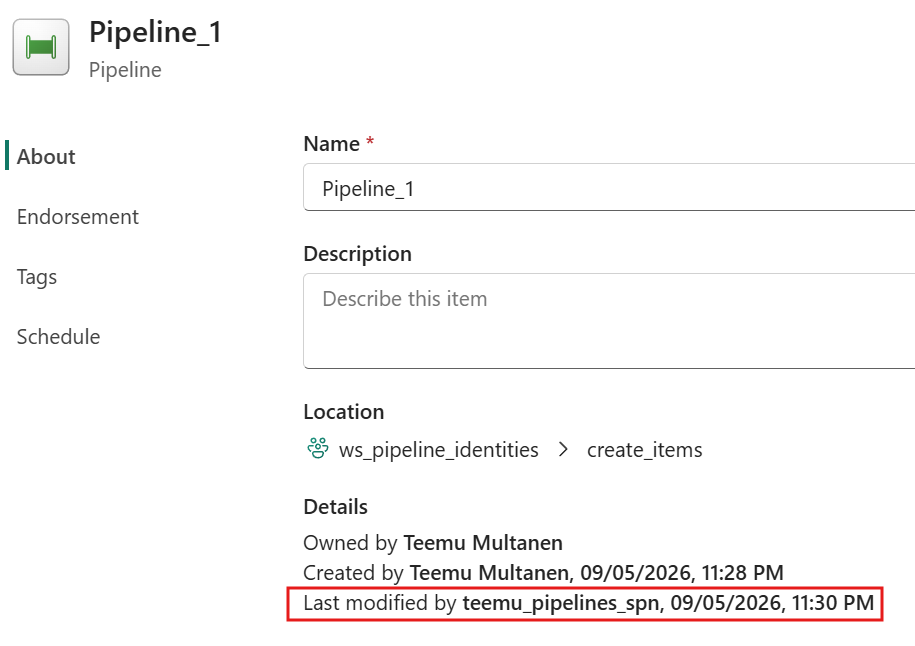
Last modifier is unsurprisingly the last identity to update the pipeline. This one can most easily be found in the pipeline settings. Modifying and saving the pipeline contents or even simply updating the description in the pipeline settings will change the last modified by identity.
How identities flow through a pipeline run
Now that we've introduced the building blocks, it's time to see how all this works in practice. I believe the best way to do so is through a simple example solution.
The items will stay the same throughout all examples, but identities and scenarios will change. In the solution, we have a data pipeline called Pipeline1. Pipeline1 is invoking another pipeline called Pipeline2. Pipeline2 contains a notebook activity that runs a notebook called Notebook1.
No connection is configured for the Notebook1 activity in any of the examples. Pipeline1 will always be triggered manually by the user. This is the same as if the user had scheduled the pipeline run.
The review of scenario one will also explain different access boundaries. The following scenarios will only focus on what changes.
Scenario 1: The initial setup
We're just starting out in a new environment. Developer1 creates all three items through the UI. He sets up a pipeline connection that uses a service principal. The connection is used to invoke Pipeline2. Developer1 triggers the pipeline manually.
Here's the identity flow:
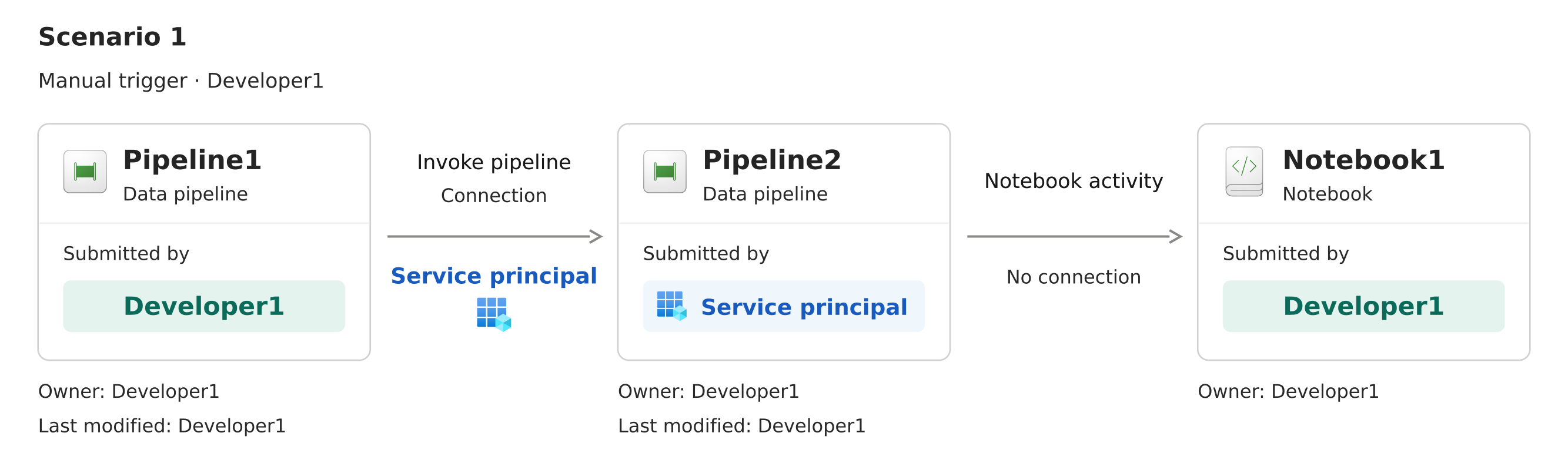
You might already see something surprising. Why is the notebook in Pipeline2 submitted by Developer1? Sure, Developer1 is very involved with all the items, but there's only one identity slot that actually matters here. It's the last modifier of Pipeline2. The identity that last modified a pipeline is the identity used for the pipeline session.
Let's go through the access boundaries:
- To trigger Pipeline1, Developer1 needs to be a Contributor or higher in the workspace.
- To invoke Pipeline2 using the connection, Developer1 needs to be a User or higher on the connection.
- To run Pipeline2, the service principal used for the pipeline connection needs to be a Contributor or higher in the workspace.
- To start the pipeline session for Pipeline2, Developer1, as the last modifier, needs to be a Contributor or higher in the workspace.
- To run the notebook, Developer1, as the last modifier of Pipeline2, needs to be a Contributor or higher in the workspace.
At least for me, everything starts simple, but quickly heads into unexpected territory. Suddenly it appears that the last modified by identity has a lot more impact than one would assume. Temporarily deactivating an activity for debugging has the power to break your pipeline runs in the future.
But how does that happen? Let's keep working on our scenario.
Scenario 2: A small change
Our pipeline has been successfully running for a few weeks now. Enter Developer2. Developer2 notices a typo in Pipeline2's description and fixes it. Everything keeps working perfectly.
Here's the identity flow:
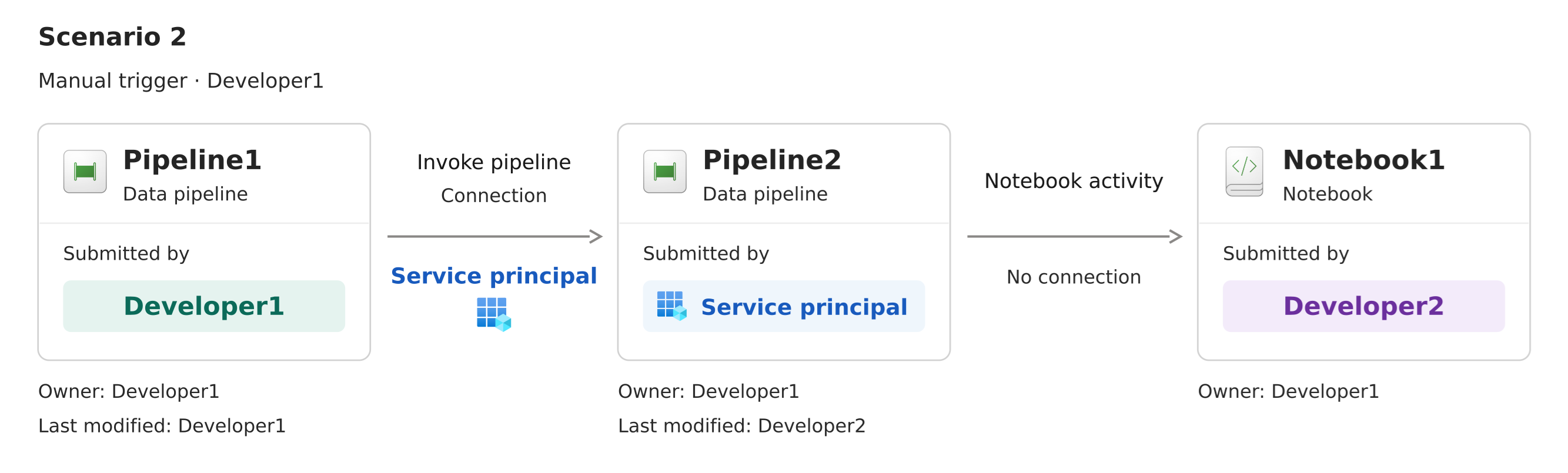
As we can see, both the last modified by identity for Pipeline2 and the submitted by identity for Notebook1 have changed.
What this means is that compared to the prior setup, Developer2 is now the one who needs access to start Pipeline2's session and run Notebook1. If we are fetching user-specific tokens in Notebook1, those will now represent the identity of Developer2 instead of Developer1.
But everything's still good, right? Sure, for now. Let's keep going.
Scenario 3: Developer2 leaves
More time passes. Developer2 leaves the company, and their account is deleted. After a while, Pipeline1 starts failing as Pipeline2 is not starting at all. The interesting part is that the error happens before a job for Pipeline2 is created, so you might think the problem is in the connection between Pipeline1 and Pipeline2. But that's not the case.
The issue is with the stored authentication linked to Developer2 as Pipeline2's last modifier. If that authentication is no longer valid, Fabric can't use it to obtain new access tokens. The next time the pipeline needs to authenticate, it fails.
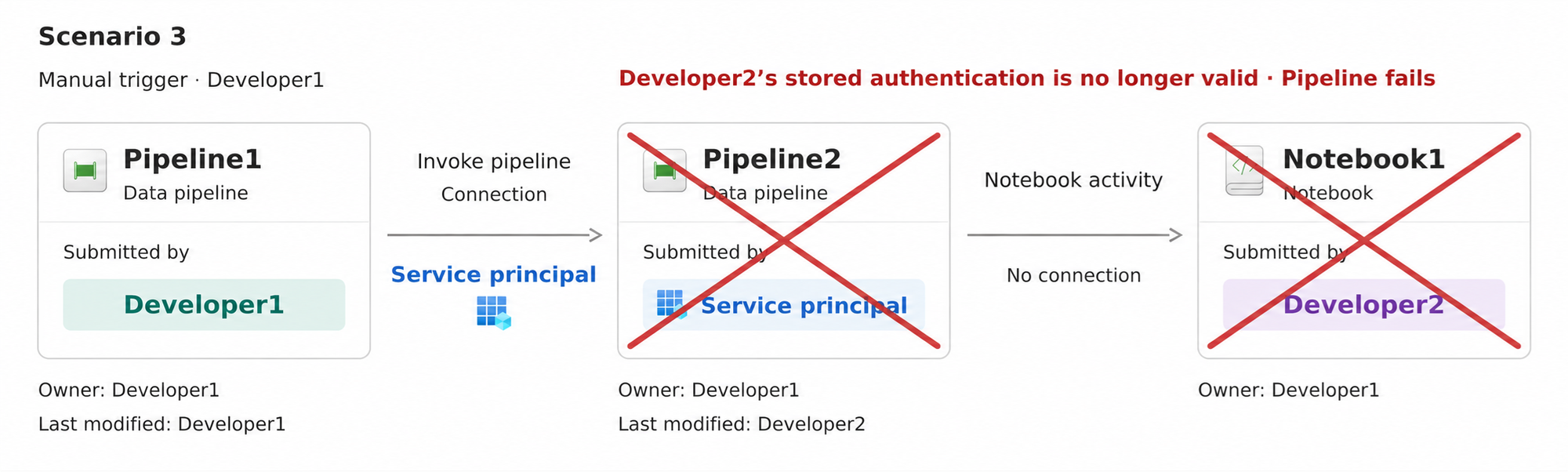
To quickly get everything running, Developer1 changes the description for Pipeline2 and saves it. This updates the last modified by identity. Back to Developer1. Everything starts working again.
Technically, we're all good now. But we're still betting on Developer1 not leaving the company or even changing their password. Password changes can also invalidate refresh tokens - which can lead to the same issue
But don't worry, we can make this sustainable.
How to keep your solutions robust
The first thing you should do is to handle deployments between environments (dev, test, prod) using service principals. You can do so by either triggering Fabric deployment pipelines through the API or using the fabric-cicd library. Each complete deployment will update the last modified by identity.
This is a good start. But again, if someone has to troubleshoot the deployed pipelines and, for example temporarily deactivate activities, the identity will change. Running the complete deployment process again will fix it, but you might not always want to do that.
Here's a lighter and simpler option you can go with instead.
To update the last modified by identity to be our service principal, we're going to be updating the pipeline through an API. Specifically, we're going to update the pipeline's description metadata field.
First of all, we need to get a token, and for that we need the service principal's credentials. The credentials are safely stored in a key vault.
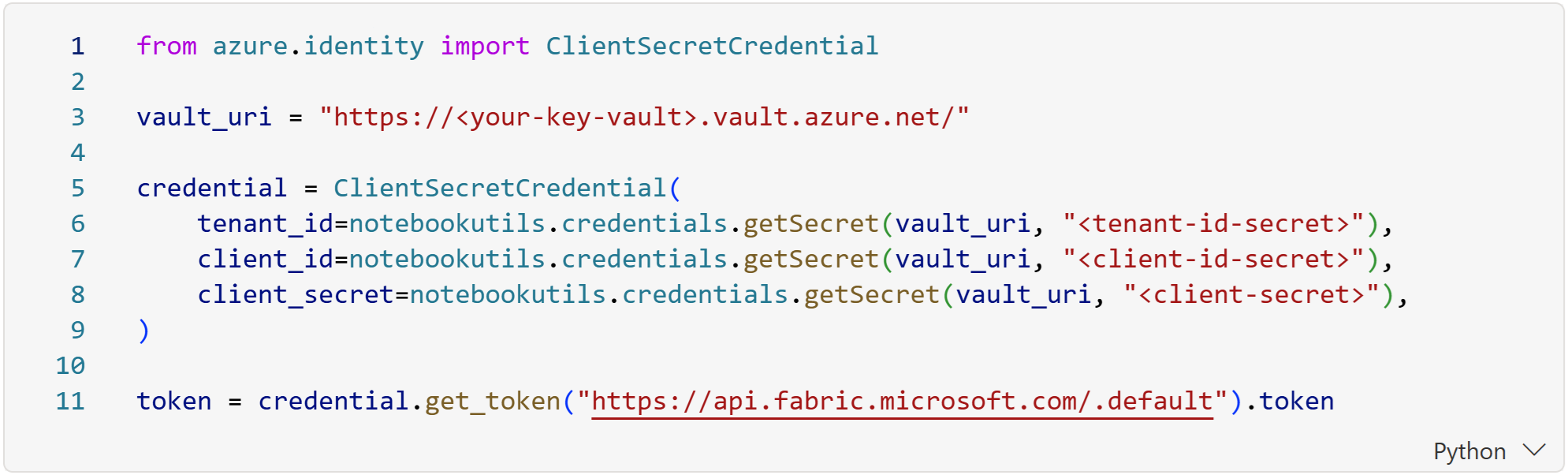
Calling the API requires knowing the pipeline's item ID. It can be found as a part of the URL after opening the pipeline.
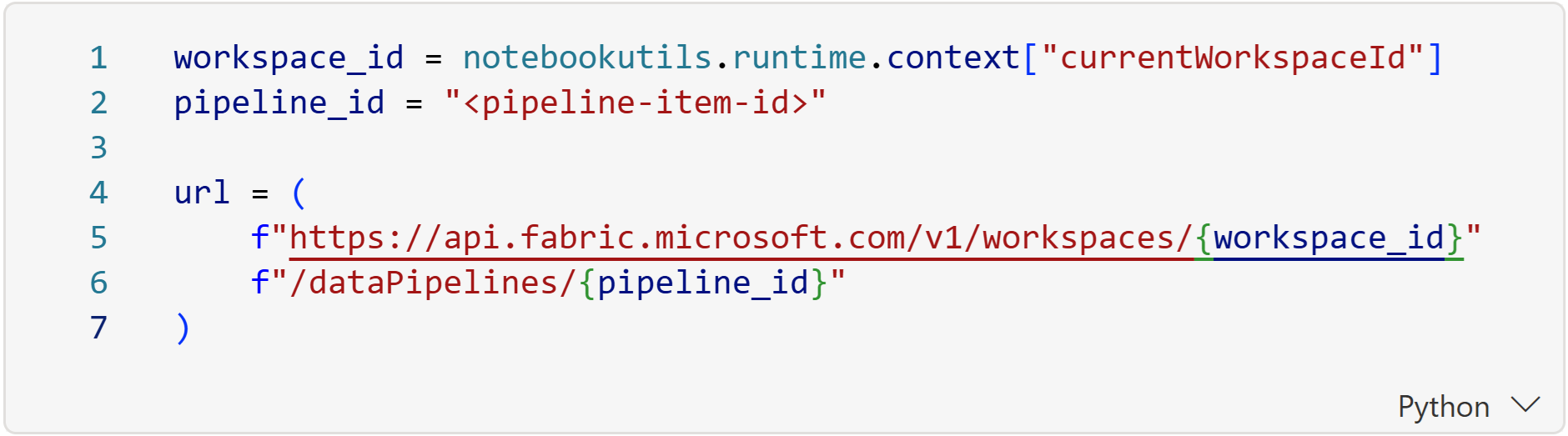
After we have the token and the complete endpoint, it's time to send the request.
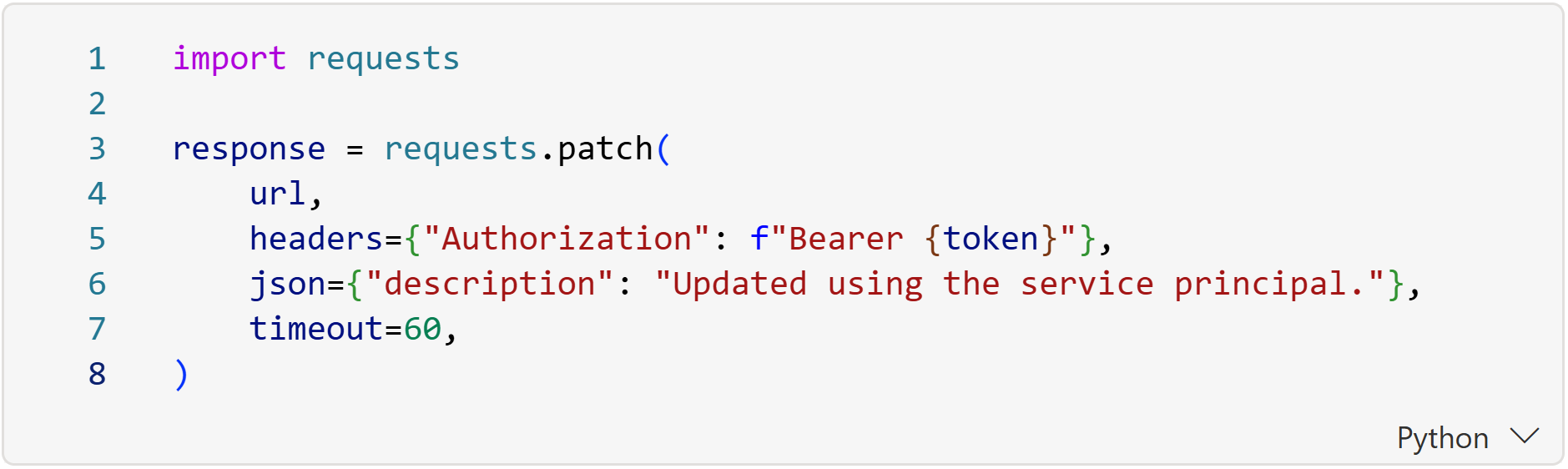
It's as simple as that. To scale it up, other APIs and some extra logic can be used. You can get all the pipelines from your current workspace, filter by name and even check which ones are not last updated by the service principal.
Summary
Understanding identities and access boundaries is mandatory for efficiently building and maintaining pipelines. Everything might appear simple at first, but it can get confusing real fast. Some errors happen under the hood and can be very hard to troubleshoot. The last modified by identity holds a lot more importance than one would expect.
This post ended up being a bit longer than I first expected, so a huge thank you for taking the time to read it. I hope it helps you make sense of your own pipeline runs.