Choosing the right tools for your Fabric solution

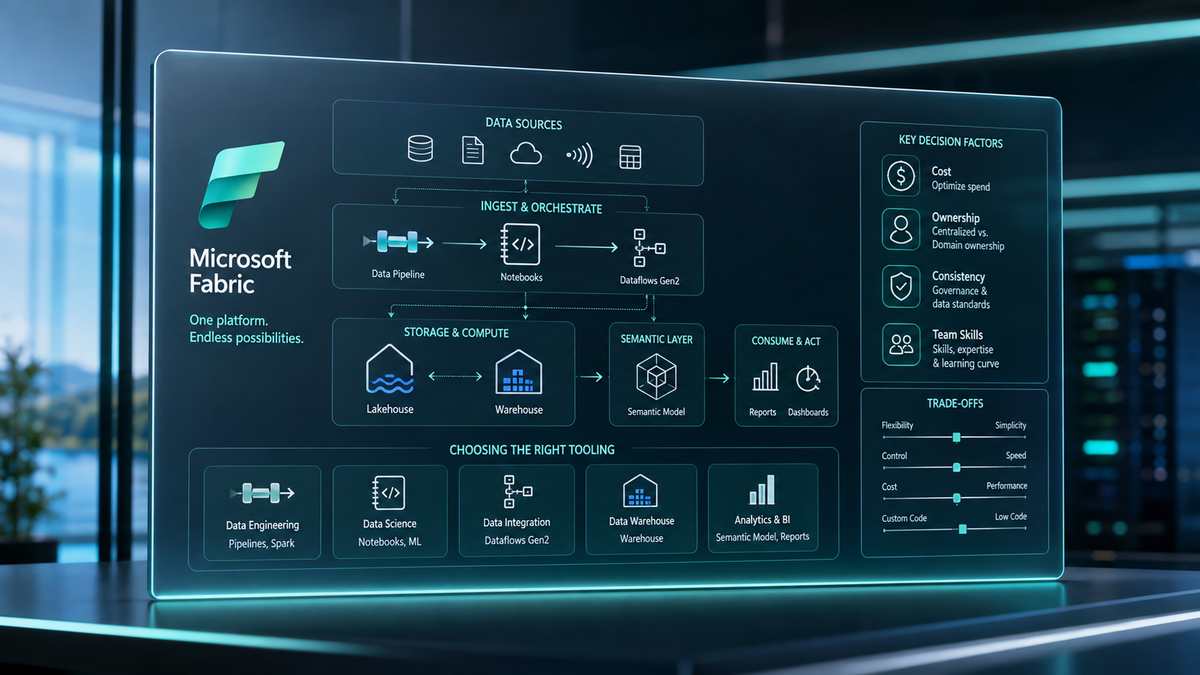
I was recently part of a panel discussion about choosing the right tooling for your Microsoft Fabric environment. Most of what I talk about here is pipelines, notebooks, and Dataflow Gen2, since that's what came up most, but the same thinking can be applied right across the platform.
After the panel I wrote a little mini series on LinkedIn highlighting the most important factors behind these decisions. Six factors covered in six posts, and none of them was really tool specific. In this post, I cover it all in one place.
Everything should start with your team
To start things off in the panel, we were all asked the same question: if you could only use one tool for ingestion and transformation, which one would it be?
Two of us said PySpark notebooks and one said Dataflow Gen2.
Why? Because we all prefer whatever allows us to be the most productive. If your team consists of data engineers who know PySpark or SQL, notebooks are a natural fit. But, if your team has mostly background in building Power BI reports, using notebooks won't be the way to provide results efficiently. In that case, Dataflow Gen2 would make more sense.
Whatever you're picking, stick with it. Don't build an environment where one workflow is using a PySpark notebook, the next Dataflow Gen2, and the third Fabric Data pipelines. The way that can happen is when you have people with different skillsets building partial solutions with no ownership model. To avoid it, find an architectural model that supports long-term solution maintenance, even if somebody has to initially go a little outside their comfort zone. Of course, using the same tools everywhere isn't always possible, but we'll come back to that later.
I'm not a big fan of low-code tools myself, but I believe they have their use in Fabric. They make the platform easy to approach, even for less-technical users. That's what allows even more people to get involved and start working with data - which is amazing. The drawback is needing to take that into account when selecting the tooling - even if we would normally prefer something else.
Cloud cost isn't the only cost
Every tooling decision in Fabric comes with more than just one cost. The capacity consumption is often the first thing that comes to mind when you're a developer. However, depending on the environment, the cost of building and maintaining the solution can be a lot higher than the cloud bills.
An optimized notebook can run very cheap - even at scale. Still, in general, writing clean and robust code takes time. AI tools have made it more efficient, but setup and knowledge are still required. A low-code solution might consume more capacity, but allows even less tech-savvy users to get something running in no time. Also, maintenance doesn't require understanding code, and can more easily be handled by junior developers with different backgrounds.
So instead of simply asking what the solution will cost to run, we should be also asking what it costs to build, maintain, and develop further. On most projects the implementation costs are front-loaded while everything else is back-loaded. That makes sense as cloud and maintenance costs will only hit once your solution is running.
When a solution has been up and running for a while, it's normal for data volumes to grow, and more integrations to be added. This is when quick and unoptimized tooling will start to take its toll and optimizing will actually make a difference.
I'm not saying that disregarding capacity consumption completely in the beginning would be the way to go. I'm simply saying that providing value fast should be the focus - optimization can come later.
Easy to build can mean locking yourself in
Low-code and no-code options in Fabric might be convenient and easy to build with, but they're also specific to the Microsoft ecosystem. If you want to migrate your solution to a different platform, that means building everything from scratch. Doing that in a large-scale environment is basically never worth it and that's what vendor lock-in means.
Spark, on the other hand, is open source. Basic functionality is the same no matter whether you're running your PySpark notebook in Fabric or in Databricks. There are small differences in platform specific libraries like notebookutils, but AI is able to tackle those quite easily. Overall, migrating spark workloads is a pretty easy task, and the same can be said for other open source workloads as well.
But why would you think about moving your solution before you've even started building it? That's a valid question. In general, open competition leads to better products and customer service. If you're not happy with what you're getting, you have the option to choose. Something a bit more rare, but worth considering is what happens at the end of service for a product.
One recent example is Dataflow Gen1 being retired somewhere in the near future. Obviously Microsoft is happy to provide an alternative withing their ecosystem - Dataflow Gen2. At the first glance, it doesn't seem like a big deal. But the thing is, if you haven't already upgraded from Power BI to Microsoft Fabric, this is the moment you're required to do so - if you want to have an easy migration experience that is.
This is not a call to steer clear of all Fabric specific tools. They work well, and make it more efficient to build solutions. Just keep your eye out for the direction the platform is headed, and plan accordingly.
Ownership matters
Ownership is the most important, and often the most overlooked thing to consider when building any solution. The importance of ownership is not limited to the tooling choices. It is the foundation that everything else leans on.
Simple tools are making it easy for more people to start building on the platform - which I already mentioned is a good thing. Unfortunately it comes with challenge. Keeping the architecture consistent across the platform becomes increasingly harder when more people are involved. Especially when those people come from different teams and departments. Everybody knowing the best development practices is not a given at that point either.
If someone is building a solution, there should be a business use case the solution will be serving. When there's a business use case being served, someone has to make sure the solution keeps working. To make sure that gets done, someone has to be responsible. And no, it won't be the famous "someone" that nobody knows - it's the one appointed as the owner.
Let's say I'm tasked with building a data ingestion solution. My first instinct would be writing a notebook or creating a fabric data pipeline. But then I'm told the solution will be owned and maintained by a business user who is familiar with Power BI and Power Query. That makes me re-evaluate the choice.
Of course, larger-scale environments will require real data teams for maintenance, but smaller ones can get away with less. The owner of the solution should still understand what is required for maintaining the solution, even if they're not the one doing it themself.
"Be a data engineer, not a data artist."
You should remind yourself of this quote every now and then. Even if building something is technically possible, that still doesn't justify building it in the first place. Business value should be the driver, not how technical the solution looks.
Boring, well-proven patterns are often the best ones. Reinventing the wheel for every solution is not necessary, and especially not efficient. Being consistent across the platform makes continuous development and maintenance easier and faster which saves time and money. Optimizing every solution in terms of capacity consumption can lead to fragmented architecture and more costs in terms of increased overhead.
If you start implementing data transformations using PySpark notebooks, that's what you should keep doing if possible. That doesn't mean every notebook should be a PySpark notebook. Handling configuration files or calling APIs is more efficient using simple Python notebooks. But when doing transformations, stick to PySpark. Code patterns changing between Spark SQL, PySpark and Spark every other notebook is not efficient and takes more time to understand when debugging or doing changes to existing code.
In larger environments, it's normal for the architecture to get more complex. It simply isn't always possible to follow the same patterns everywhere and exceptions have to be made. For example, mirroring or shortcut solutions most often can't follow the same patterns as regular data copying options. You should still try to keep things as simple as possible, and focus on providing results instead of over-engineered solutions.
In the end, it's about the organization
What I've learned after working across countless different customer environments and organizations is that the hardest challenges are never technical. You can have the best team of developers ever, but that alone isn't enough to solve every problem.
It can be very hard to determine what consistent tooling even means if the organizational structure is siloed. Different people can be responsible for different parts of the platform. If those key players can't come to an agreement on what the end-to-end architecture should look like, you'll end up with a fragmented solution anyway.
In these cases, you should still try to find as much common ground as possible. Even when different teams want to build with different tools, some basic foundations should be agreed to be followed. Maybe one team prefers notebooks and the other team prefers dataflows. Both teams can still agree to use lakehouses as data stores and service principals as the primary identity type for connections. Same naming conventions should also be followed across the whole platform.
As a consultant, I can say that there are major differences between customers. Some like to be involved and understand the architectural decisions being made. These customers often have their own data teams or at least someone who's been given the time and the responsibility of the platform. This is where you also have to take their preferences into account.
The other customer type only cares about the results. They don't care how you're building it, they just want it done and ready to use. This is where it's okay to work with your preferred tools to get things done efficiently - as long as you stay within budget and the cloud costs stay reasonable. It's still important to apply best practices and create documentation so the next person can pick up where you left off.
Summary
Team skills, overall costs, migration readiness, ownership model, architectural consistency, and organizational context. These are the important factors providing the framework when choosing the tooling for your solution.
I believe building around your team, staying consistent and ensuring clear ownership will already take you far. The other factors are still important, but these three are what I would focus on first.